
Proxy Wallets
Managing proxy wallets for payment processing
Proxy Wallets
Proxy wallets are custodial wallets managed by the platform to receive customer payments. This guide explains how to view and manage proxy wallets.
What Are Proxy Wallets?
Proxy wallets:
- Receive customer payments on behalf of merchants
- Hold funds temporarily before settlement
- Are managed by the platform
- Have unique addresses per payment or namespace
Accessing Proxy Wallets
- Click Proxy Wallets in the sidebar under the Ops section
- The proxy wallets list displays all wallets in the system
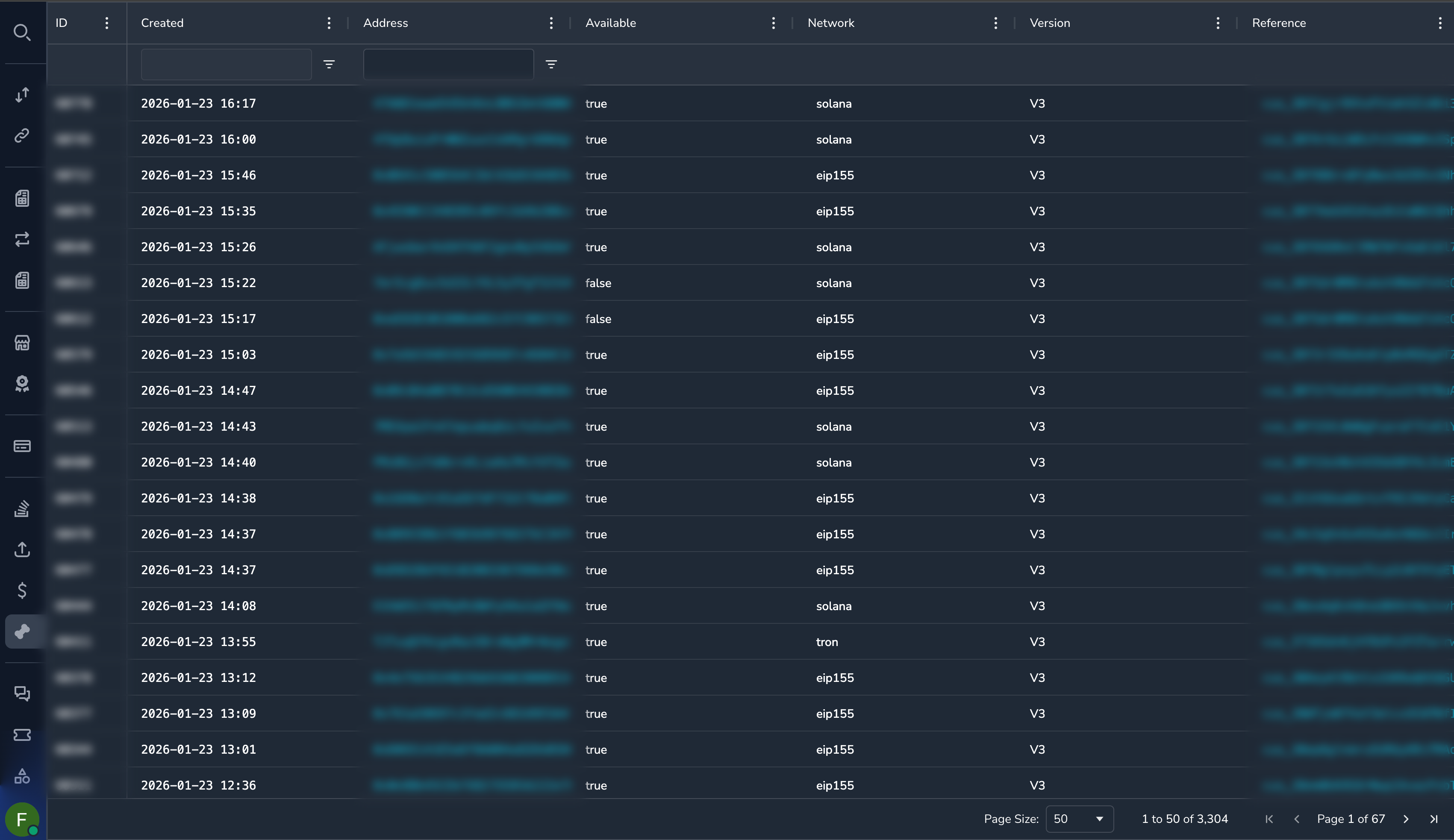
Understanding the Proxy Wallets Grid
| Column | Description |
|---|---|
| Wallet ID | Unique identifier |
| Address | Wallet address on blockchain |
| Namespace | Wallet namespace or category |
| Reference | Associated reference (payment, merchant, etc.) |
| Network | Blockchain network |
| Created | When the wallet was created |
Viewing Proxy Wallet Details
Click on any proxy wallet to see detailed information:
Wallet Information
| Field | Description |
|---|---|
| Wallet ID | Unique identifier |
| Address | Blockchain address |
| Namespace | Organizational namespace |
| Network | Blockchain network |
| Reference | Associated entity |
| Created | Creation date |
Associated Accounts
View accounts linked to this proxy wallet:
- Settlement accounts
- Balance accounts
- Transaction accounts
Pending Payments
View any payments pending to this wallet:
- Payment ID
- Expected amount
- Status
Transactions
View transactions related to this wallet:
- Incoming (customer payments)
- Outgoing (settlements, withdrawals)
Wallet Accounts
Each proxy wallet may have multiple associated accounts:
- Click on the proxy wallet
- Select Accounts tab
- View all linked accounts
Account information includes:
- Account ID
- Type
- Balance information
- Status
Processing Withdrawals
Authorized users can initiate withdrawals from proxy wallet accounts.
WarningWithdrawals move actual funds. Verify all details carefully before proceeding.
Withdrawal Process
- Open the proxy wallet details
- Select the account to withdraw from
- Click Withdraw
- Enter withdrawal details:
- Recipient address
- Amount
- Token/currency
- Review the details
- Click Confirm
Withdrawal Fields
| Field | Description |
|---|---|
| Recipient Address | Destination wallet address |
| Token | Currency/token to withdraw |
| Amount | Amount to send |
| Network | Blockchain network |
After Withdrawal
Once initiated:
- The withdrawal enters processing
- A blockchain transaction is created
- Track status in the wallet's transaction history
- Verify completion on blockchain explorer
Common Tasks
Finding a Wallet by Address
- Use global search with the wallet address
- Or go to Proxy Wallets and use the Address filter
Checking Wallet Balance
- Open the proxy wallet
- View the Accounts tab
- Check balances for each account
- Or navigate to Balances and filter by account
Viewing Wallet Transactions
- Open the proxy wallet details
- Select the Transactions tab
- View incoming and outgoing transactions
Finding Pending Payments
- Open the proxy wallet details
- Select the Pending Payments tab
- View payments awaiting receipt
Permissions
| Role | View Wallets | Process Withdrawals |
|---|---|---|
| Super Admin | Yes | Yes |
| Admin | Yes | Yes |
| Payment Ops | Yes | No |
| Compliance Ops | Yes | No |
| CS Ops | Yes | No |
| Finance Ops | Yes | No |
| View Only | Yes | No |
Best Practices
Before Withdrawals
- Verify the recipient address — Double-check the destination
- Confirm the amount — Ensure the amount is correct
- Check the network — Verify the correct blockchain
- Document the reason — Know why the withdrawal is needed
Security Considerations
- Withdrawals are logged with user ID and timestamp
- Large withdrawals may require additional approval
- Always verify recipient addresses match expected destinations
- Report any suspicious withdrawal activity
Related Topics
- Balances — Account balances
- Settlements — Settlement transactions
- Balance Details — Balance movements
Updated 6 months ago
Did this page help you?