
Payment History
Viewing the event history and audit trail for payments
Payment History
Every payment maintains a complete history of events from creation through completion. This audit trail helps you understand what happened during the payment lifecycle and who took what actions.
Accessing Payment History
- Navigate to the payment you want to review
- Open the payment detail view
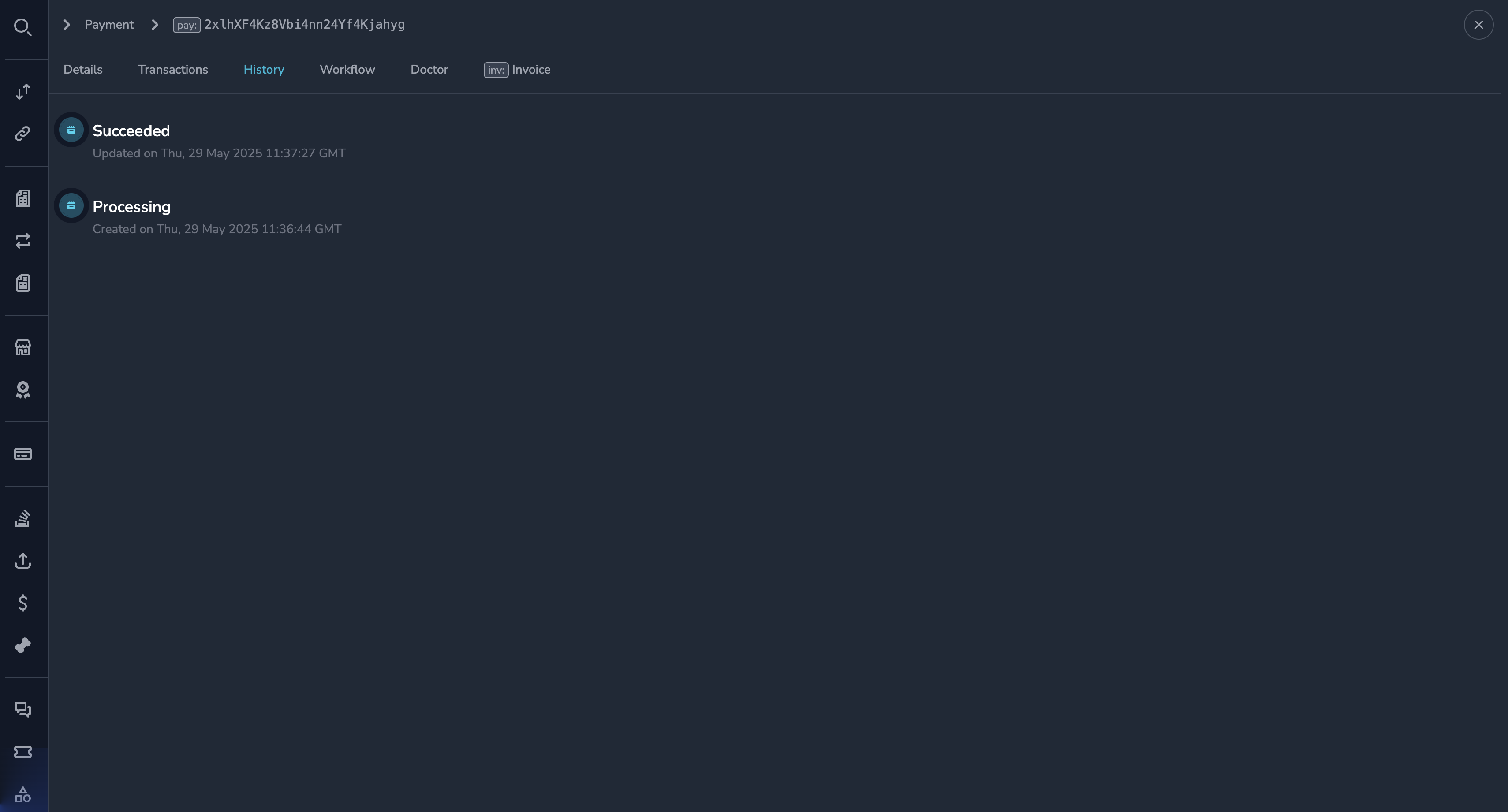
- Click the History tab
Understanding the Event Timeline
The history displays events in reverse chronological order (newest first). Each event shows:
| Field | Description |
|---|---|
| Timestamp | When the event occurred |
| Event Type | What happened |
| Details | Additional context about the event |
| User | Who triggered the event (for manual actions) |
Common Event Types
Payment Lifecycle Events
| Event | Description |
|---|---|
| Payment Created | Payment was initialized |
| Payment Method Set | Customer selected how to pay |
| Funds Detected | Incoming transaction detected on blockchain |
| Funds Confirmed | Blockchain confirmations completed |
| Processing Started | Settlement processing began |
| Payment Succeeded | Payment completed successfully |
| Payment Failed | Payment could not complete |
| Payment Canceled | Payment was canceled |
Manual Action Events
| Event | Description |
|---|---|
| Payment Approved | Operator approved a flagged payment |
| Payment Rejected | Operator rejected a payment |
| Payment Canceled by User | Operator manually canceled |
| Refund Initiated | Operator started a refund |
| Doctor Applied | Payment Doctor correction made |
System Events
| Event | Description |
|---|---|
| Rule Triggered | A compliance or business rule fired |
| Flagged for Review | Payment sent to manual review queue |
| Workflow Started | Background workflow initiated |
| Workflow Completed | Background workflow finished |
Event Details
Click on any event to expand its details:
For Manual Actions
- User ID — Who performed the action
- User Name — Display name of the operator
- Reason/Notes — Any notes provided with the action
- Timestamp — Exact time of the action
For System Events
- Trigger — What caused the event
- Rule Name — If a rule was involved
- System Notes — Technical details
For Blockchain Events
- Transaction Hash — The blockchain transaction ID
- Block Number — Which block included the transaction
- Confirmations — Number of confirmations at the time
Using History for Investigation
The payment history helps you answer questions like:
| Question | What to Look For |
|---|---|
| Why was this payment flagged? | Look for "Rule Triggered" or "Flagged for Review" events |
| Who approved this payment? | Find the "Payment Approved" event and check the user |
| When did funds arrive? | Check the "Funds Detected" event timestamp |
| Why did this payment fail? | Look for "Payment Failed" event details |
| What correction was made? | Find "Doctor Applied" events |
Audit Trail for Compliance
The payment history serves as a complete audit trail:
- Every action is logged with a timestamp
- Manual actions include the operator's identity
- Records cannot be modified or deleted
- The trail shows the complete payment journey
NoteThe audit trail is permanent and provides a complete record for compliance purposes. All manual interventions are attributed to specific users.
Exporting History
To export the history for a payment:
- View the payment history
- Click the Export button (if available)
- The history exports as a CSV or PDF file
Workflow Details
For technical debugging, you can access the underlying workflow system:
- In the payment history, look for workflow events
- Click View Workflow to see technical details
- This shows the internal processing steps
NoteWorkflow details are primarily for technical support. Contact your system administrator if you need help interpreting workflow information.
Best Practices
Regular Monitoring
- Check history when investigating payment issues
- Review the timeline to understand payment flow
- Use history to verify that actions were taken correctly
For Investigations
- Start from the most recent event
- Work backwards to find the relevant point
- Look for manual actions that may have affected the outcome
- Check for rule triggers or flags
For Reporting
- Export history for compliance reports
- Use event timestamps for SLA tracking
- Document patterns across multiple payments
Permissions
All users who can view a payment can view its history. The history is read-only—no user can modify historical records.
Related Topics
- Payment Details — Understanding payment information
- Reviewing Payments — Actions that create history entries
- Payment Doctor — Corrections that appear in history
Updated 7 months ago