
Transaction History
Viewing a customer's payment and transaction history
Transaction History
The transaction history shows all payments and transactions for a customer. This guide explains how to view and understand customer transaction history.
Accessing Transaction History
- Navigate to the customer detail view
- Click the Transactions tab
- View all transactions for this customer
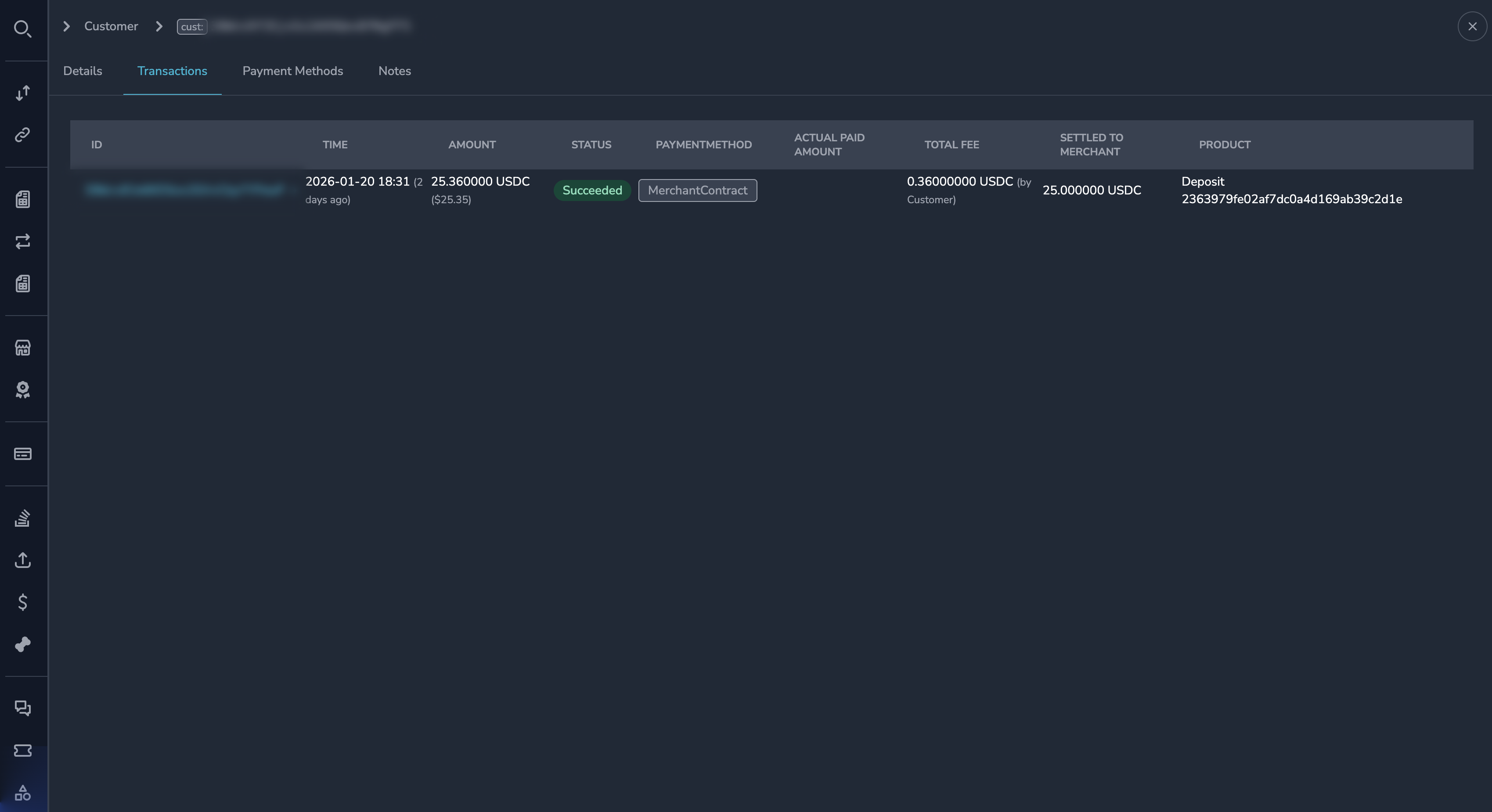
Understanding the Transaction List
Each transaction shows:
| Field | Description |
|---|---|
| Payment ID | Unique payment identifier |
| Date | When the transaction occurred |
| Amount | Transaction amount |
| Currency | Payment currency |
| Status | Payment status |
| Merchant | Which merchant received the payment |
Filtering Transactions
By Status
- Click the Status filter
- Select one or more statuses
- Click Apply
By Date Range
- Click the Date filter
- Select a date range
- Click Apply
By Merchant
If viewing a customer user (across merchants):
- Click the Merchant filter
- Select a merchant
- Click Apply
Viewing by Merchant vs. Globally
Per-Merchant View
When viewing a Customer (specific merchant relationship):
- Only shows transactions with that merchant
- Context is limited to one business relationship
Global View
When viewing a Customer User (underlying user):
- Shows transactions across all merchants
- Filter by merchant to narrow down
- See the complete customer history
Transaction Details
Click on any transaction to view full details:
- Complete payment information
- Blockchain transaction details
- Settlement status
- Event history
This opens the same Payment Details view used in the Payments section.
Common Tasks
Finding a Specific Transaction
- Open the customer's transaction history
- Use filters to narrow down by date or status
- Click on the transaction to view details
Checking for Failed Payments
- Open transaction history
- Filter by Status = "Failed"
- Review failed transactions and reasons
Calculating Total Volume
The transaction history may show:
- Total transaction count
- Total payment volume
- Average transaction value
If not displayed, export the data for analysis.
Exporting History
To export a customer's transaction history:
- View the transactions tab
- Apply any desired filters
- Click Export (if available)
- Download the file
Understanding Patterns
When reviewing customer history, look for:
| Pattern | May Indicate |
|---|---|
| Regular intervals | Subscription payments |
| Same amounts | Recurring purchases |
| Multiple failures | Payment issues |
| Varying merchants | Multi-merchant user |
Permissions
| Role | View Transactions |
|---|---|
| Super Admin | Yes |
| Admin | Yes |
| Payment Ops | Yes |
| Compliance Ops | Yes |
| CS Ops | Yes |
| Finance Ops | Yes |
| View Only | Yes |
Best Practices
Customer Support
When helping a customer:
- Review their recent transactions
- Identify the specific transaction in question
- Check the transaction status and history
- Provide accurate information about timing and status
Investigation
When investigating customer activity:
- Look at the full transaction history
- Identify any unusual patterns
- Cross-reference with other data sources if needed
- Document your findings
Related Topics
- Customer Profile - Customer information
- Payment Details - Individual payment information
- Internal Notes - Support notes
Updated 7 months ago
Did this page help you?