

https://pay.boomfi.xyz. The checkout runs in an iframe served by BoomFi: payment details, wallet connections, and payment state never touch your page.
Choosing a UI mode
A checkout session’sui_mode picks one of three ways to present the same checkout:
This page covers
Embedded, which is the default ui_mode for a session and what @boomfi-sdk/connect-web opens. For Hosted, see Checkout. Lite is the standalone form of the same lightweight checkout, for when you want that UI without embedding it — ask your BoomFi contact for the setup if you’re choosing Lite, since it isn’t covered by the rest of this page.
0. Get Connect enabled for your org
Connect is enabled per organisation for pilot integrations, and nothing below this line is reachable until it is: every/checkout/* call 404s, and the Checkout tab under Settings doesn’t even appear in your dashboard’s navigation. Contact your BoomFi representative first and confirm they’ve turned it on before you try anything else.
How it fits together
- You register the origin your checkout page is served from
- Your server creates a checkout session and gets back a client secret
- Your page installs
@boomfi-sdk/connect-weband opens the overlay with that secret - The customer completes payment inside the overlay
- Your backend receives a webhook and updates order state
1. Register a checkout origin
Once per org, before the first session — the origin your checkout page is served from. Add it inhttps://app.boomfi.xyz/dashboard/settings/checkout, under Origins:
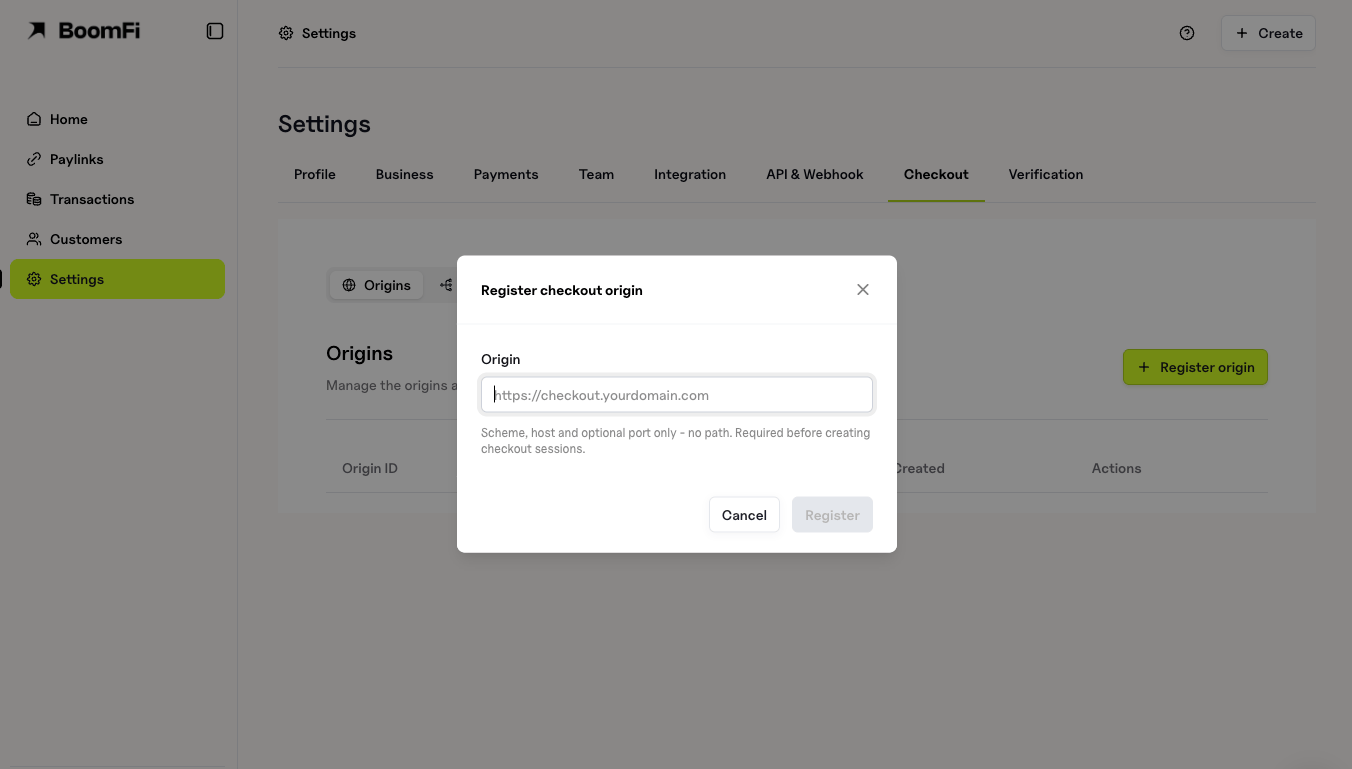
origin must be a bare scheme://host[:port] — no path, query, fragment, wildcard, or IP literal. Register every origin you serve a checkout page from (www, checkout, staging) separately. Re-registering an origin you already have re-enables it rather than failing.
If your site sends a Content Security Policy, also allow the checkout as a frame source, or the overlay opens empty with a frame-ancestors error in the console:
https://pay-test.boomfi.xyz for the test environment.
2. Create a checkout session
From your server, never your page — it needs your API key:Notable fields
client_secret in the response is returned once, by this call only — it is stored only as a digest, so a repeated create returns the session without it. Pass it straight to your page; do not log it.
3. Install the SDK and open the overlay
environment must match where you created the session — a test-environment secret opened against production (or the reverse) fails with session_not_found.
A payer who just paid and closed the overlay, and one who changed their mind, both arrive at
onClose as reason: "user_requested", resumable: false — identical. Treating that as “cancelled” tells someone who paid that they did not. Say something true either way (“checking your payment”) and confirm from your server (see Confirm the payment).connect.canResume on page load, before the payer has to ask — a payer can return to a live checkout up to 30 days after it was created if a payment is attached, so this is not only for a page reload moments later.
Modal or inline
By defaultopen() draws a modal: backdrop, page scroll lock, focus trap, and a close button. Pass container to mount the checkout inline into an element on your own page instead — no backdrop, no scroll lock, no focus trap, no close button. The frame fills whatever size and position container already has, the same as any other iframe you embed yourself:
unstyled: true to go one step further and drop the SDK’s own sizing and loading indicator too — a bare <iframe> you size and load-state entirely yourself:
- No close affordance. There’s no backdrop or button to close it with — the only way to take the checkout down is your own code calling
connect.close()orconnect.destroy(). - No confirm-before-close on a payment in flight. The overlay’s “your payment is still in progress” prompt has nowhere to render without a backdrop, so
close()/destroy()act immediately, with no confirmation, exactly as today.onClosestill fires withreason: "merchant_requested",resumable: true— decide what to tell the customer from that, same as you would for the overlay’sresumable. resume()needs the container again. Only the client secret survives a page reload; a DOM element cannot. Passcontainertoconnect.resume({ container })the same way you did toopen(), or you get the default modal back instead of your inline slot.
What the customer sees
Connect’s pilot payment rail is Wallet Transfer: the customer picks a chain and token from the ones your payment link’s plan quotes, and the checkout shows a deposit address (and QR code) to send the payment to. There is nothing your page does here — it is entirely inside the BoomFi iframe. The checkout polls for the on-chain deposit and moves to a success state once it confirms. Confirmation time is chain-dependent and can run from minutes to several hours, which is why a session with a payment attached stays usable well past itsexpires_at — a customer who left to fund a wallet can come back to a live checkout later.
Confirm the payment
Treat your webhook as the only source of truth for whether the payment succeeded — see Verify Webhook Signatures and Event Types. Fulfil the order only onPayment.Updated with status: Succeeded; onReady, onClose, and onError are UI signals only and are lost if the tab closes or the connection drops mid-payment.
The webhook does not carry the checkout session’s ID, so it alone does not tell you which of your own orders it belongs to. Read the session back to get the join key:
- After
onClose, read the session and store itspayment_idagainst your order — that is what a later webhook joins on. - For a payer who never comes back, run this on a schedule against sessions that are still
Openwith a payment attached, so a deposit that lands after the tab closed still reaches the right order.
payment_id and status still Open is a payment in flight, not a failure.
Troubleshooting
Next steps
- Checkout — the redirect-based alternative to Connect
- Webhooks Overview
- Event Types