> ## Documentation Index
> Fetch the complete documentation index at: https://docs.boomfi.xyz/llms.txt
> Use this file to discover all available pages before exploring further.
# Configure Webhooks
> Set your webhook URL and manage the webhook signing public key in the dashboard or API.
## Dashboard (recommended)
### Webhook URL and public key
Open **Settings → Business**:
`https://app.boomfi.xyz/dashboard/settings/merchant`
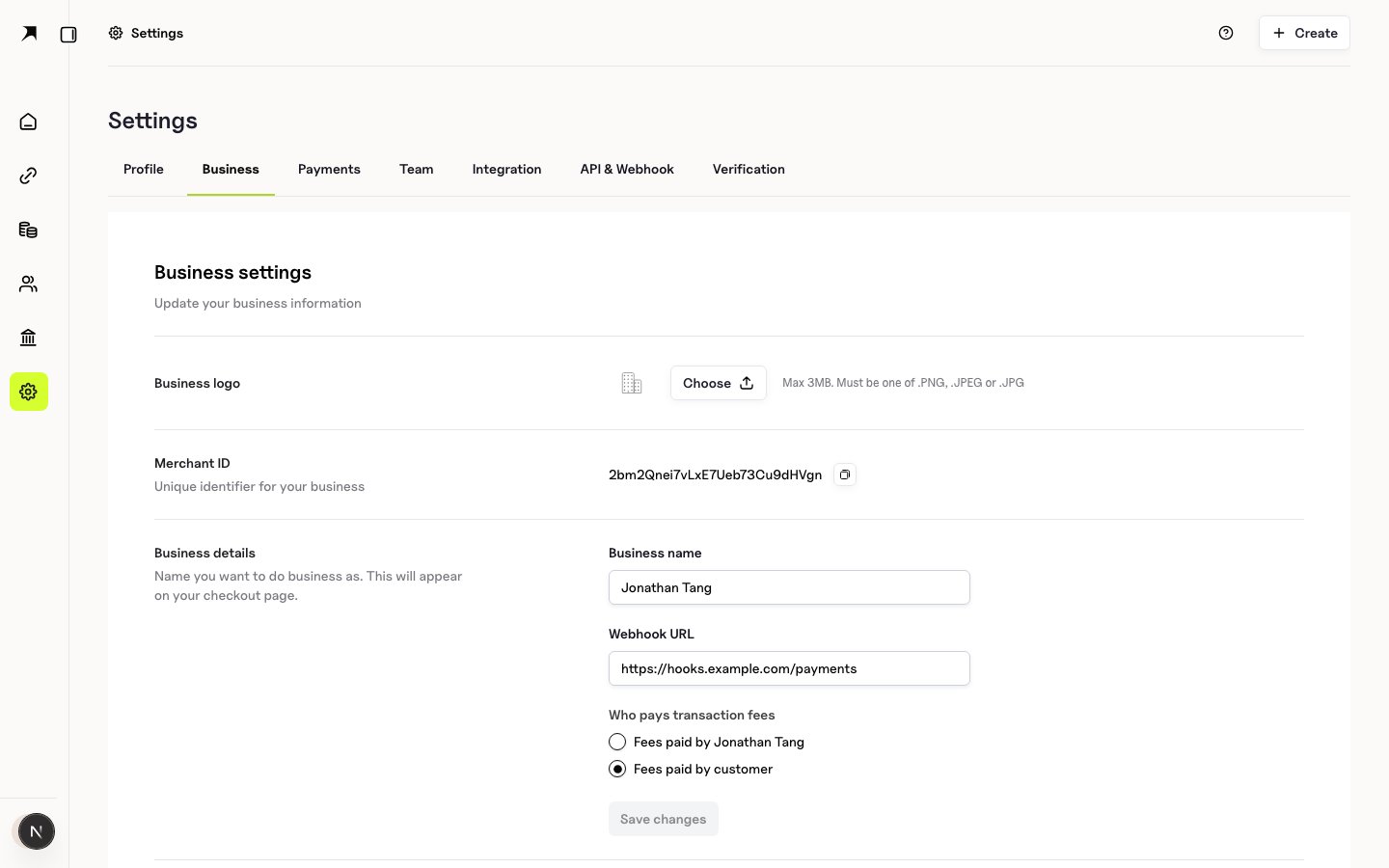 * **Webhook URL**: HTTPS endpoint that accepts JSON POSTs
* **Webhook public key**: PEM public key used to [Verify Webhook Signatures](/webhooks/verify-signatures)
* Use the rotate control to regenerate the key pair if the private key may be compromised
Public key text is also shown for copy; PEM newlines may appear escaped (`\n`) in some API responses: normalise to real newlines before verification.
### Event history
Open **Settings → API & Webhook → Webhooks** tab:
`https://app.boomfi.xyz/dashboard/settings/api-keys?tab=webhooks`
* **Webhook URL**: HTTPS endpoint that accepts JSON POSTs
* **Webhook public key**: PEM public key used to [Verify Webhook Signatures](/webhooks/verify-signatures)
* Use the rotate control to regenerate the key pair if the private key may be compromised
Public key text is also shown for copy; PEM newlines may appear escaped (`\n`) in some API responses: normalise to real newlines before verification.
### Event history
Open **Settings → API & Webhook → Webhooks** tab:
`https://app.boomfi.xyz/dashboard/settings/api-keys?tab=webhooks`
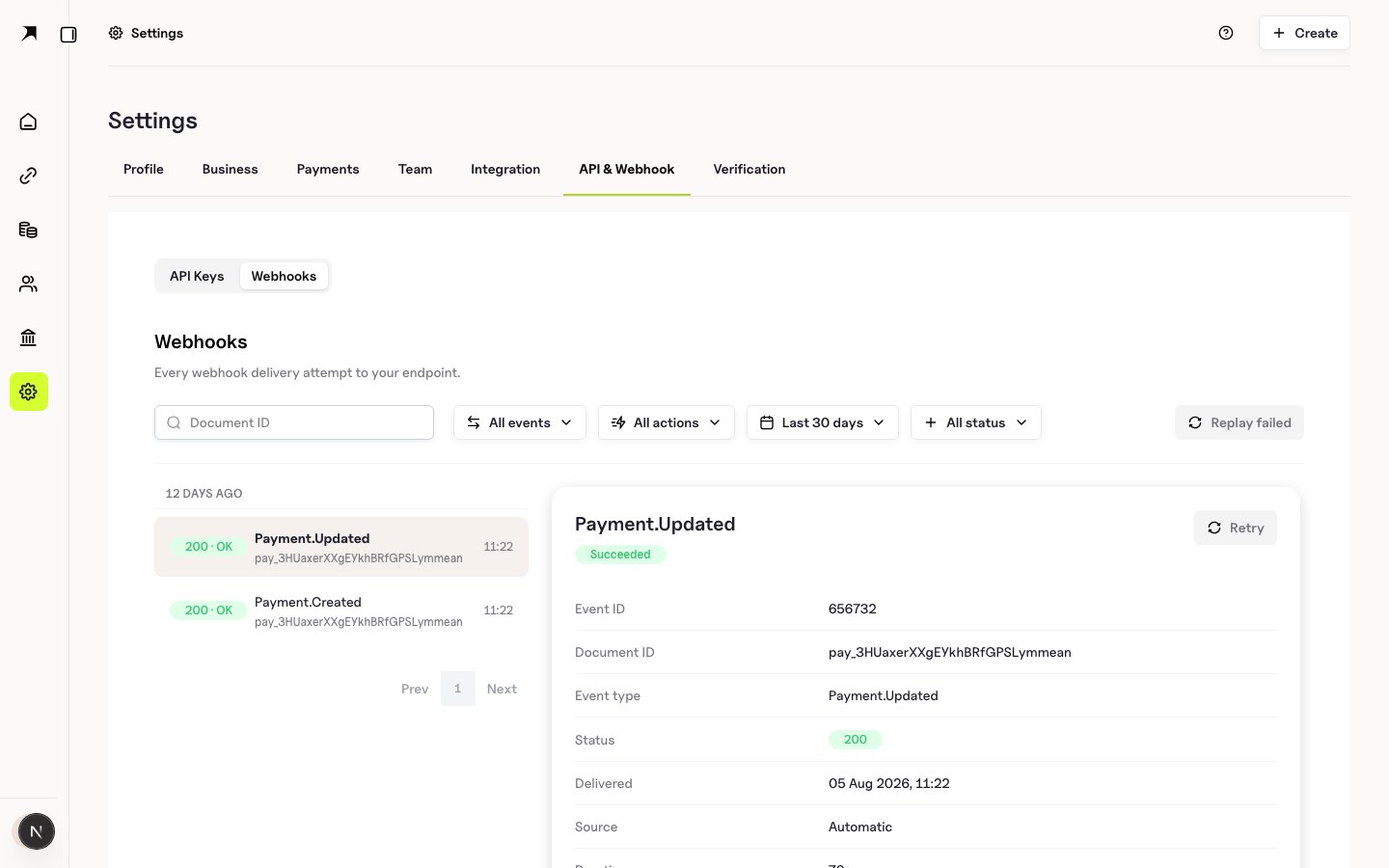 Filter, inspect payloads, retry failed deliveries, and bulk-replay failures. See [Event History and Replay](/webhooks/event-history-and-replay).
## API
### Update organisation webhook URL
```bash theme={null}
curl -X PUT "https://mapi.boomfi.xyz/v1/orgs" \
-H "X-API-KEY: sk_test_xxx" \
-H "Content-Type: application/json" \
-d '{
"webhook_url": "https://api.example.com/webhooks/payments"
}'
```
Use fields supported by the update organisation schema (name, logo, webhook URL, fee payer, underpay tolerances, email notification settings). See API reference → Organisation.
### Rotate webhook secret / key pair
```bash theme={null}
curl -X PATCH "https://mapi.boomfi.xyz/v1/orgs/webhook-secret" \
-H "X-API-KEY: sk_test_xxx"
```
Returns updated organisation material including the new public key material as implemented by the Merchants API.
### Get organisation
```bash theme={null}
curl "https://mapi.boomfi.xyz/v1/orgs" \
-H "X-API-KEY: sk_test_xxx"
```
Includes webhook public key when configured.
## Local development
Tunnel your local server (for example with a reverse proxy or tunnel tool) so the platform can reach an HTTPS (or tunnelled) URL. Always verify signatures even in development.
## Next steps
* [Verify Webhook Signatures](/webhooks/verify-signatures)
* [Event Types](/webhooks/event-types)
Filter, inspect payloads, retry failed deliveries, and bulk-replay failures. See [Event History and Replay](/webhooks/event-history-and-replay).
## API
### Update organisation webhook URL
```bash theme={null}
curl -X PUT "https://mapi.boomfi.xyz/v1/orgs" \
-H "X-API-KEY: sk_test_xxx" \
-H "Content-Type: application/json" \
-d '{
"webhook_url": "https://api.example.com/webhooks/payments"
}'
```
Use fields supported by the update organisation schema (name, logo, webhook URL, fee payer, underpay tolerances, email notification settings). See API reference → Organisation.
### Rotate webhook secret / key pair
```bash theme={null}
curl -X PATCH "https://mapi.boomfi.xyz/v1/orgs/webhook-secret" \
-H "X-API-KEY: sk_test_xxx"
```
Returns updated organisation material including the new public key material as implemented by the Merchants API.
### Get organisation
```bash theme={null}
curl "https://mapi.boomfi.xyz/v1/orgs" \
-H "X-API-KEY: sk_test_xxx"
```
Includes webhook public key when configured.
## Local development
Tunnel your local server (for example with a reverse proxy or tunnel tool) so the platform can reach an HTTPS (or tunnelled) URL. Always verify signatures even in development.
## Next steps
* [Verify Webhook Signatures](/webhooks/verify-signatures)
* [Event Types](/webhooks/event-types)