> ## Documentation Index
> Fetch the complete documentation index at: https://docs.boomfi.xyz/llms.txt
> Use this file to discover all available pages before exploring further.
# Connect
> Embed BoomFi checkout on your own page with @boomfi-sdk/connect-web.
Connect embeds the same checkout as [Checkout](/payments/checkout) in an overlay on your own page, instead of redirecting the customer to `https://pay.boomfi.xyz`. The checkout runs in an iframe served by BoomFi: payment details, wallet connections, and payment state never touch your page.
## Choosing a UI mode
A checkout session's `ui_mode` picks one of three ways to present the same checkout:
| `ui_mode` | Where it runs | How the customer returns |
| - | - | - |
| `Hosted` | Full page on `https://pay.boomfi.xyz` | `success_url` / `cancel_url` redirect |
| `Lite` | Same lightweight checkout as `Embedded`, but as its own standalone page — not framed | `success_url` / `cancel_url` redirect |
| `Embedded` | The same lightweight checkout, framed inside your page via `@boomfi-sdk/connect-web` | Stays on your page; you get `return_url` instead |
This page covers `Embedded`, which is the default `ui_mode` for a session and what `@boomfi-sdk/connect-web` opens. For `Hosted`, see [Checkout](/payments/checkout). `Lite` is the standalone form of the same lightweight checkout, for when you want that UI without embedding it — ask your BoomFi contact for the setup if you're choosing `Lite`, since it isn't covered by the rest of this page.
## 0. Get Connect enabled for your org
Connect is enabled per organisation for pilot integrations, and nothing below this line is reachable until it is: every `/checkout/*` call 404s, and the **Checkout** tab under Settings doesn't even appear in your dashboard's navigation. Contact your BoomFi representative first and confirm they've turned it on before you try anything else.
## How it fits together
1. You register the origin your checkout page is served from
2. Your server creates a checkout session and gets back a client secret
3. Your page installs `@boomfi-sdk/connect-web` and opens the overlay with that secret
4. The customer completes payment inside the overlay
5. Your backend receives a webhook and updates order state
## 1. Register a checkout origin
Once per org, before the first session — the origin your checkout page is served from. Add it in `https://app.boomfi.xyz/dashboard/settings/checkout`, under **Origins**:
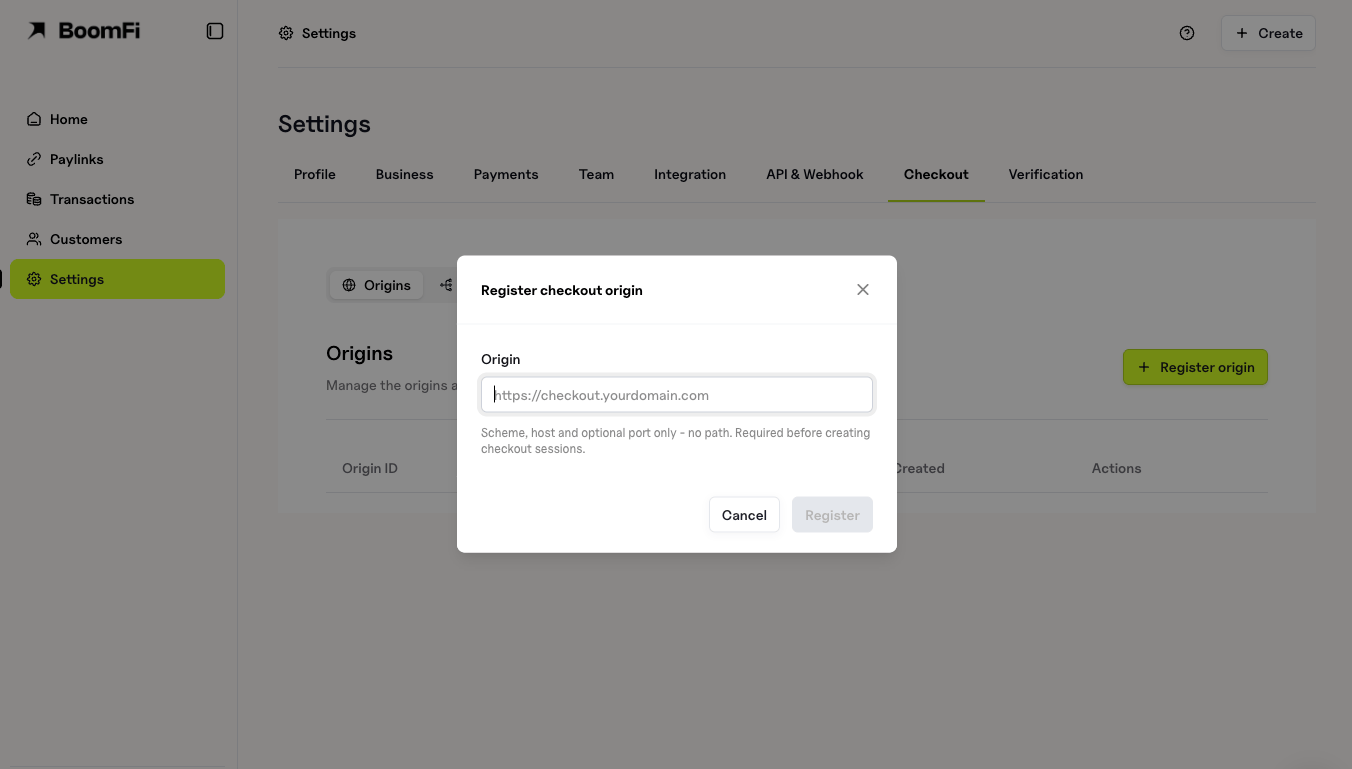 Or from your server:
```bash theme={null}
curl -X POST "https://mapi.boomfi.xyz/v1/checkout/origins" \
-H "X-API-KEY: sk_test_xxx" \
-H "Content-Type: application/json" \
-d '{
"origin": "https://shop.example"
}'
```
`origin` must be a bare `scheme://host[:port]` — no path, query, fragment, wildcard, or IP literal. Register every origin you serve a checkout page from (`www`, `checkout`, staging) separately. Re-registering an origin you already have re-enables it rather than failing.
If your site sends a Content Security Policy, also allow the checkout as a frame source, or the overlay opens empty with a `frame-ancestors` error in the console:
```
frame-src https://pay.boomfi.xyz;
```
Use `https://pay-test.boomfi.xyz` for the test environment.
## 2. Create a checkout session
From your server, never your page — it needs your API key:
```bash theme={null}
curl -X POST "https://mapi.boomfi.xyz/v1/checkout/sessions" \
-H "X-API-KEY: sk_test_xxx" \
-H "Content-Type: application/json" \
-d '{
"payment_link_id": "2ZxK1qLm9vQnR7sT4uY6wB8cD0e",
"allowed_origin": "https://shop.example",
"merchant_request_id": "dep_92817"
}'
```
### Notable fields
| Field | Description |
| - | - |
| `payment_link_id` | Required for the overlay to have a price to render. |
| `allowed_origin` | Omit when you have registered exactly one origin; required when you have registered more than one. Must match a registered origin. |
| `merchant_request_id` | Your idempotency key. Repeating one with the same parameters returns the existing session with `client_secret` absent. |
| `customer_reference` | Your identifier for the payer. Send a distinct one per payer — two concurrent payers on one payment link can otherwise collide. |
| `amount` / `currency` | Only if set, and must match the payment link's own price. |
`client_secret` in the response is returned once, by this call only — it is stored only as a digest, so a repeated `create` returns the session without it. Pass it straight to your page; do not log it.
## 3. Install the SDK and open the overlay
```bash theme={null}
npm install @boomfi-sdk/connect-web
```
```javascript theme={null}
import { init } from "@boomfi-sdk/connect-web";
const connect = init({ environment: "test" }); // "production" once you're live
// clientSecret is what your server got back in step 2.
connect.open({
clientSecret,
onReady: () => console.log("checkout visible"),
onClose: ({ reason, resumable }) => {
// resumable: true means a payment was in flight — offer a way back with
// connect.resume(). Ask your server what happened; do not infer it from
// reason alone (see the note below).
},
onError: ({ message, code }) => {
// The overlay stays open showing `message` — see Troubleshooting below.
},
});
```
`environment` must match where you created the session — a `test`-environment secret opened against `production` (or the reverse) fails with `session_not_found`.
A payer who just paid and closed the overlay, and one who changed their mind, both arrive at `onClose` as `reason: "user_requested"`, `resumable: false` — identical. Treating that as "cancelled" tells someone who paid that they did not. Say something true either way ("checking your payment") and confirm from your server (see [Confirm the payment](#confirm-the-payment)).
Call `connect.canResume` on page load, before the payer has to ask — a payer can return to a live checkout up to 30 days after it was created if a payment is attached, so this is not only for a page reload moments later.
### Modal or inline
By default `open()` draws a modal: backdrop, page scroll lock, focus trap, and a close button. Pass `container` to mount the checkout inline into an element on your own page instead — no backdrop, no scroll lock, no focus trap, no close button. The frame fills whatever size and position `container` already has, the same as any other iframe you embed yourself:
```javascript theme={null}
connect.open({
clientSecret,
container: document.getElementById("checkout-slot"),
});
```
Add `unstyled: true` to go one step further and drop the SDK's own sizing and loading indicator too — a bare `
Or from your server:
```bash theme={null}
curl -X POST "https://mapi.boomfi.xyz/v1/checkout/origins" \
-H "X-API-KEY: sk_test_xxx" \
-H "Content-Type: application/json" \
-d '{
"origin": "https://shop.example"
}'
```
`origin` must be a bare `scheme://host[:port]` — no path, query, fragment, wildcard, or IP literal. Register every origin you serve a checkout page from (`www`, `checkout`, staging) separately. Re-registering an origin you already have re-enables it rather than failing.
If your site sends a Content Security Policy, also allow the checkout as a frame source, or the overlay opens empty with a `frame-ancestors` error in the console:
```
frame-src https://pay.boomfi.xyz;
```
Use `https://pay-test.boomfi.xyz` for the test environment.
## 2. Create a checkout session
From your server, never your page — it needs your API key:
```bash theme={null}
curl -X POST "https://mapi.boomfi.xyz/v1/checkout/sessions" \
-H "X-API-KEY: sk_test_xxx" \
-H "Content-Type: application/json" \
-d '{
"payment_link_id": "2ZxK1qLm9vQnR7sT4uY6wB8cD0e",
"allowed_origin": "https://shop.example",
"merchant_request_id": "dep_92817"
}'
```
### Notable fields
| Field | Description |
| - | - |
| `payment_link_id` | Required for the overlay to have a price to render. |
| `allowed_origin` | Omit when you have registered exactly one origin; required when you have registered more than one. Must match a registered origin. |
| `merchant_request_id` | Your idempotency key. Repeating one with the same parameters returns the existing session with `client_secret` absent. |
| `customer_reference` | Your identifier for the payer. Send a distinct one per payer — two concurrent payers on one payment link can otherwise collide. |
| `amount` / `currency` | Only if set, and must match the payment link's own price. |
`client_secret` in the response is returned once, by this call only — it is stored only as a digest, so a repeated `create` returns the session without it. Pass it straight to your page; do not log it.
## 3. Install the SDK and open the overlay
```bash theme={null}
npm install @boomfi-sdk/connect-web
```
```javascript theme={null}
import { init } from "@boomfi-sdk/connect-web";
const connect = init({ environment: "test" }); // "production" once you're live
// clientSecret is what your server got back in step 2.
connect.open({
clientSecret,
onReady: () => console.log("checkout visible"),
onClose: ({ reason, resumable }) => {
// resumable: true means a payment was in flight — offer a way back with
// connect.resume(). Ask your server what happened; do not infer it from
// reason alone (see the note below).
},
onError: ({ message, code }) => {
// The overlay stays open showing `message` — see Troubleshooting below.
},
});
```
`environment` must match where you created the session — a `test`-environment secret opened against `production` (or the reverse) fails with `session_not_found`.
A payer who just paid and closed the overlay, and one who changed their mind, both arrive at `onClose` as `reason: "user_requested"`, `resumable: false` — identical. Treating that as "cancelled" tells someone who paid that they did not. Say something true either way ("checking your payment") and confirm from your server (see [Confirm the payment](#confirm-the-payment)).
Call `connect.canResume` on page load, before the payer has to ask — a payer can return to a live checkout up to 30 days after it was created if a payment is attached, so this is not only for a page reload moments later.
### Modal or inline
By default `open()` draws a modal: backdrop, page scroll lock, focus trap, and a close button. Pass `container` to mount the checkout inline into an element on your own page instead — no backdrop, no scroll lock, no focus trap, no close button. The frame fills whatever size and position `container` already has, the same as any other iframe you embed yourself:
```javascript theme={null}
connect.open({
clientSecret,
container: document.getElementById("checkout-slot"),
});
```
Add `unstyled: true` to go one step further and drop the SDK's own sizing and loading indicator too — a bare `